
Include and Exclude Pages
By default, Sitepager scans all accessible pages it can find from your Website URL. Use these settings to control exactly which pages are included in a scan.
Find these settings under Advanced Settings > Update scan scope in your scan settings.
How it works
Section titled “How it works”Sitepager uses three controls to determine which pages to scan:
Website URL sets the starting point. Sitepager crawls from this URL and follows the links to discover pages.
Exclude URL patterns removes pages that match a pattern. Any page matching an exclude pattern is skipped.
Include URLs adds specific pages that are always scanned, even if they match an exclude pattern.
Exclude patterns are applied first. Include URLs override them.
How exclude and include interact
Section titled “How exclude and include interact”- Sitepager starts from your Website URL and discovers pages by following links
- Discovered pages are checked against exclude patterns. Matches are skipped.
- Include URLs are always scanned, even if they match an exclude pattern
- If Crawl included URLs is enabled, links found on included pages are also followed and still subject to exclude patterns
- The total number of pages scanned is capped by your max pages setting
Subdomains
Section titled “Subdomains”Subdomains are excluded by default. Each subdomain should be scanned separately so it can have its own baseline and run history.
Example site structure
Section titled “Example site structure”To make these concepts easier to understand, here is an example site structure we will use throughout this page:
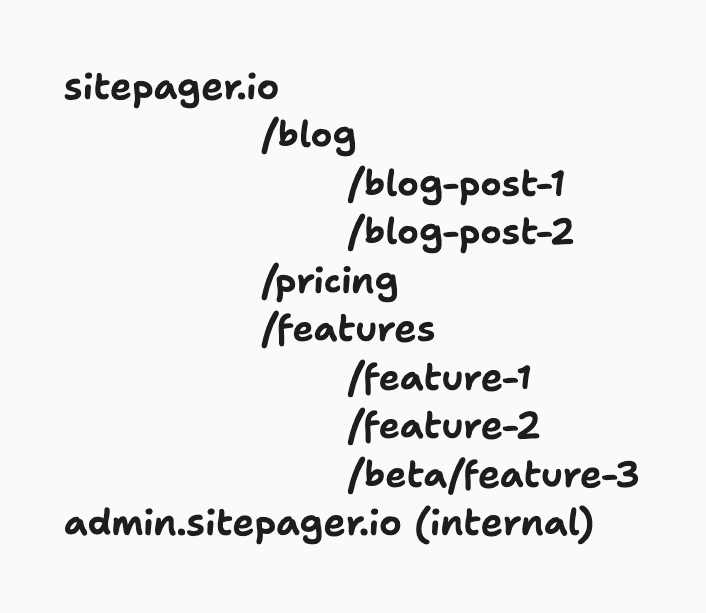
Choosing the right Website URL
Section titled “Choosing the right Website URL”The Website URL defines the entry point of the crawl and determines which pages are included in your scan. Here is how to pick the right Website URL based on your goals.
| What you want to scan | Website URL | Additional configuration |
|---|---|---|
| The entire site | Homepage (yoursite.com) | Use Exclude URL patterns to skip sections |
| A specific section | Section URL (yoursite.com/features) | Use Exclude URL patterns for finer control |
| Specific key pages only | Homepage (yoursite.com) | Use Include URLs for exact pages. Use Crawl included URLs to control depth |
| A subdomain | Subdomain URL (subdomain.yoursite.com) | Subdomains must be scanned separately. Each as its own Website URL |
Exclude URL patterns
Section titled “Exclude URL patterns”Use exclude patterns to skip pages or sections you do not need in your scan.
Open Advanced Settings > Update scan scope and add patterns under Exclude URL patterns. Enter multiple patterns separated by commas or press Enter after each one.
Examples:
/blogskips URLs containing/blog(for example/blog/post-1)/adminskips URLs containing/admin(for example/admin/dashboard)/apiskips URLs containing/api(for example/api/v1)
Patterns support simple text matching. If you enter /blog, any URL containing /blog is skipped.
For advanced control, regex patterns can also be used. For example, ^(?!.*\/blog\/).*$ excludes all pages that are not under /blog/.
Include URLs
Section titled “Include URLs”Use Include URLs to add specific pages that are always scanned, regardless of exclude patterns.
Add URLs under Include URLs in the scan scope settings. You can enter full URLs like https://yoursite.com/pricing or paths like /pricing.
Crawl included URLs is an option below the include list.
- Disabled: only the exact URLs you listed are scanned
- Enabled: Sitepager also follows links found on those pages and scans them too, within your max pages limit
Common setups
Section titled “Common setups”Scan the full site but skip a section
Section titled “Scan the full site but skip a section”Goal: Scan all public pages but skip blog posts.
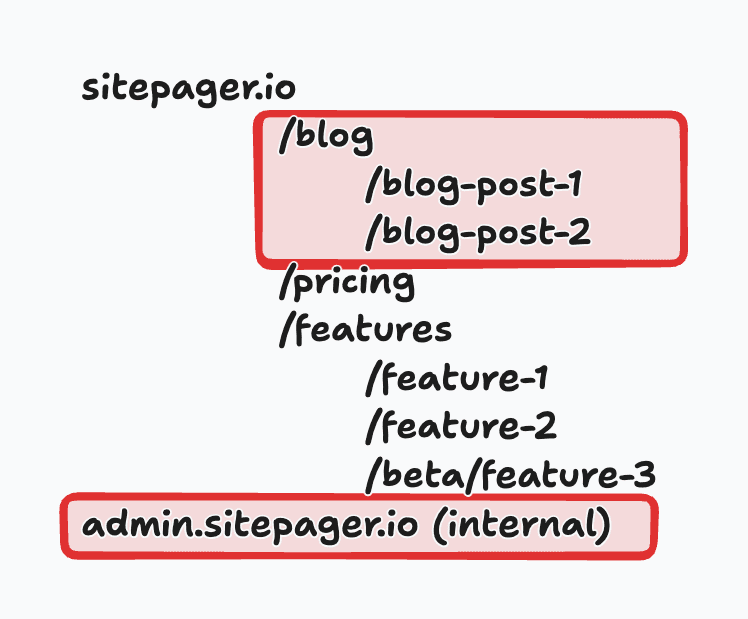
Configuration:
- Website URL:
https://sitepager.io - Exclude URL patterns:
/blog
Result: Sitepager crawls all pages linked from the homepage except anything under /blog. The admin.sitepager.io subdomain is skipped by default. Subdomains require a separate scan.
Scan a specific section and skip a subsection
Section titled “Scan a specific section and skip a subsection”Goal: Scan all pages under /features but skip beta features.
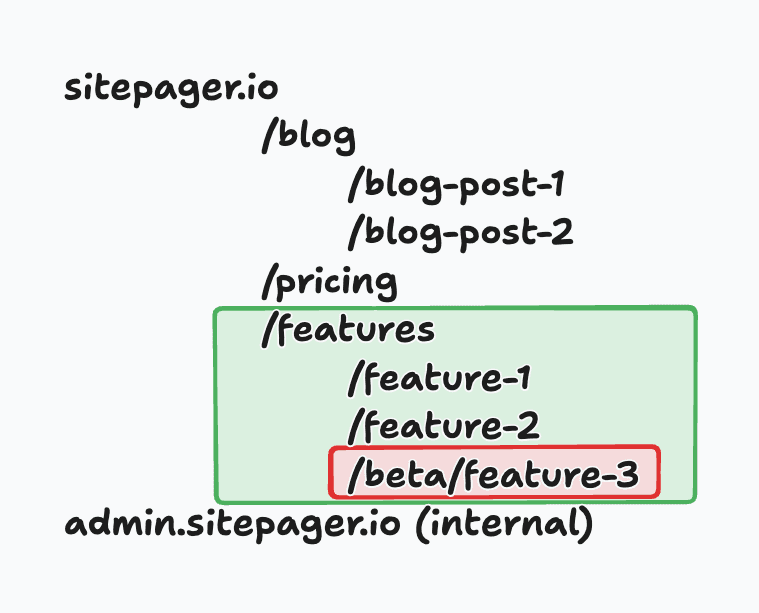
Configuration:
- Website URL:
https://sitepager.io/features - Exclude URL patterns:
/features/beta
Result: Sitepager crawls all pages under /features, excluding anything under /features/beta.
Scan only key pages
Section titled “Scan only key pages”Goal: Scan only your most important pages. Homepage, pricing, and features.
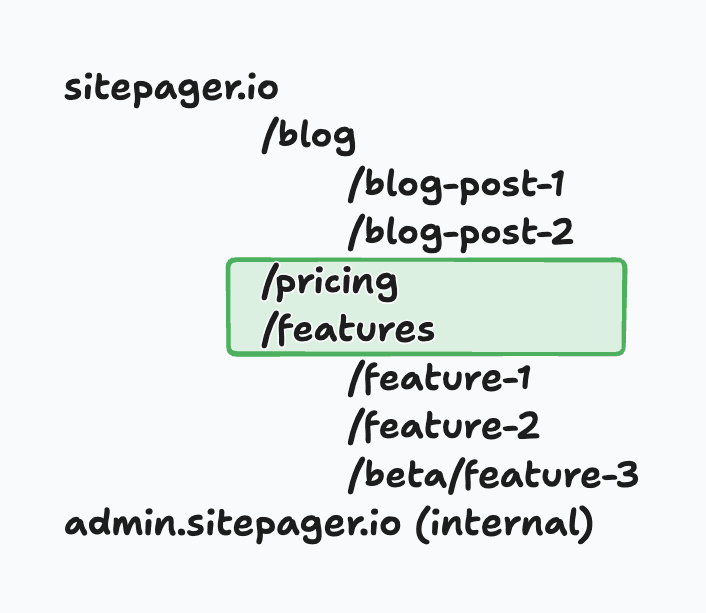
Configuration:
- Website URL:
https://sitepager.io - Include URLs:
https://sitepager.io/pricing,https://sitepager.io/features - Crawl included URLs: Disabled or Enabled
Result:
- Crawl included URLs disabled: Sitepager scans only the pricing page and features page. Child pages under
/featuresare not scanned. - Crawl included URLs enabled: Sitepager scans the pricing page, features page, and all pages linked from the included URLs.
To include the homepage, add / to the include list.